

What do you do when a Meta Ad refuses to run?
You don’t guess. You diagnose.
Let me show you exactly how I troubleshoot issues like this.
I will share a real example from a recent campaign.
A client reached out to me to help run ads for their business.
Since they didn’t already have a Facebook Page, I created one for them, connected it to a Business Portfolio, linked their WhatsApp, set up the campaign, and launched the ads.
Now, because they operate in the savings and contribution space, I already knew Meta would likely review the ads more carefully.
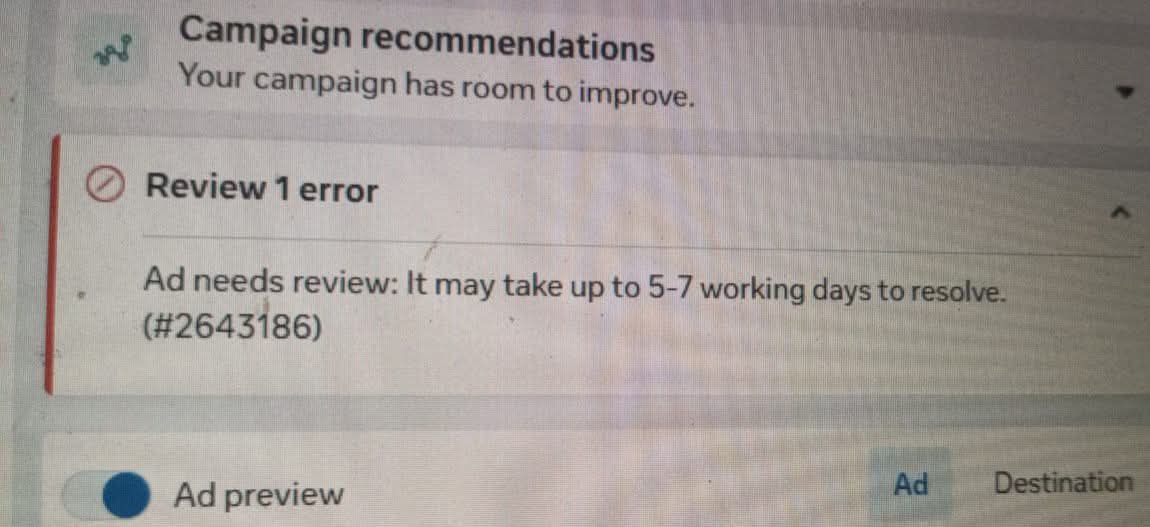
But after publishing, I noticed something unusual.
Instead of the normal review process, Meta was saying the ads could take 5–7 days to be reviewed. (Check attached screenshot)
That immediately told me something wasn’t quite right.
My first assumption was that it might be the creative. The image talked about rewards for saving, and financial-related ads usually go through stricter reviews.
So I created a completely different video creative.
Same result.
I created more variations (images and videos)
Same result.
At that point, I stopped trying random fixes and started diagnosing the problem.
Whenever an ad behaves differently from what I expect, I usually ask myself three questions:
– Is it the ad account?
– Is it the ad itself?
– Or is it the Facebook Page?
Before I continue, let me quickly mention something that I think every freelancer or marketer should learn.
The client had already paid for my service and paid for funding the ad account.
So While I was troubleshooting, I made sure I updated her every step of the way.
Every morning, I’d send a message explaining what I had tested, what I had ruled out, what I was currently working on, and reassure her that I wouldn’t stop until we got it sorted.
She never panicked because she always knew what was happening.
One thing I’ve learned from working with clients is this:
People are usually patient when you communicate.
Silence is what creates frustration.
Now, back to the troubleshooting.
The first thing I did was use that same ad account to launch an ad for another client on a completely different Facebook Page.
The ad ran successfully.
So I ruled out the ad account.
Next, I took another ad account and tried launching this client’s campaign.
Exactly the same issue.
Now I knew it wasn’t the ad account.
Then I went a step further.
I took an ad that had worked successfully before and published it on this client’s Page.
Same problem.
That was another clue.
Finally, I took the exact ad creative that had been giving me issues and published it from a completely different Facebook Page.
It was approved.
At that point, I had my answer.
The issue wasn’t the creative.
It wasn’t the ad account.
It was the Facebook Page.
So I created a brand-new Page, connected everything again, launched the campaign…
…and the ads started running normally.
This is why I always say running Meta Ads isn’t just about knowing where the buttons are.
A big part of the job is knowing how to troubleshoot logically.
Instead of guessing, you isolate variables one after another until you find the actual source of the problem.
That’s the process I follow whenever I run into issues.
Hopefully, seeing how I think through these situations helps you the next time you’re troubleshooting your own campaigns.
I hope this helps
~King Ighosotu Ntekume
#ExpandEazy #Kingighosotuntekume #metaads #facebookadsspecialist<!– wp:heading –>
<h2 class=”wp-block-heading”>Recent Posts</h2>
<!– /wp:heading –><!– wp:heading –>
<h2 class=”wp-block-heading”>Recent Posts</h2>
<!– /wp:heading –><!– wp:heading –>
<h2 class=”wp-block-heading”>Recent Posts</h2>
<!– /wp:heading –>